


The short answer
TurboOffice is built for AI agents. You ask for the offer, the counter, the listing or the signatures, in TurboOffice or in the AI agent you already use, and it does the work on your state's forms. You read it and approve it.
Dotloop, owned by Zillow, is one of the most widely used transaction systems in the country, with forms from more than 190 associations and MLSs, a free plan and mobile apps. It is built for the agent to do each step by hand: open the form, autofill what the loop already has, type the rest, assign each signature and share it. We found no AI of Dotloop's own on its product pages, and no way to work a loop from your own AI agent.
Choose TurboOffice if you want to do the work of a deal by asking for it, in TurboOffice or in your own AI agent.
Choose Dotloop if you want a free plan or the lowest price for one agent, your brokerage already runs its compliance in Dotloop, or you need your state's forms today and TurboOffice does not have that state yet.
Built for AI agents
TurboOffice is built for AI agents. Almost all the work of a deal can be done by asking for it, in TurboOffice's own assistant or in the AI agent you already use, from anywhere that agent runs. The screens are for reading what it did and approving it.
Most transaction software was built the other way, for a person to click through: open a form, type into each field, drag each signature box into place. Some of it is good software, and some has added AI features to those screens. The agent still does the work.
- Any AI agent. TurboOffice connects to Claude, ChatGPT, Muse, Grok, Instinct and any other AI agent that takes connectors. See how to connect one.
- The whole deal, not one step. A connected AI agent has 53 tools, and the docs list every one. It can start a listing, write an offer or a counter on the state's forms, change a contract, set a document up for signing, file a PDF that arrived, add a task and read what a deal still needs.
- You approve what matters. Anything that sends paper for signature or binds a contract waits as a card that says what approving it does. Smaller changes, such as a task or a note, happen at once and can be undone. Nobody signs for you.
- Open. The docs, the list of tools and the plugin's source code are public, and the site keeps a plain-text copy for AI agents to read.
Dotloop: forms the agent fills in
We found no AI feature of Dotloop's own on its product pages. They describe templates, forms that fill from the loop's details and a document editor.
Dotloop's help center lists an integration with Indigo, a separate company whose AI reads uploaded documents, extracts key terms and checks signatures for a brokerage's compliance team (Dotloop's help center).
Dotloop has a public API that a developer requests access to. Its documentation covers creating loops, updating their details, adding people and uploading documents (Dotloop's API documentation). We found no connector for an AI agent on its pages.
What you can ask for
Each row is something an agent says. The middle column is what TurboOffice does with it. The last is what Dotloop's own pages say about the same request: "not found" means it is not on the pages we read.
| You ask | TurboOffice | Dotloop |
|---|---|---|
| "What needs me today?" | Yes. Lists the tasks, appointments and deals that need you | Not found on the pages we read |
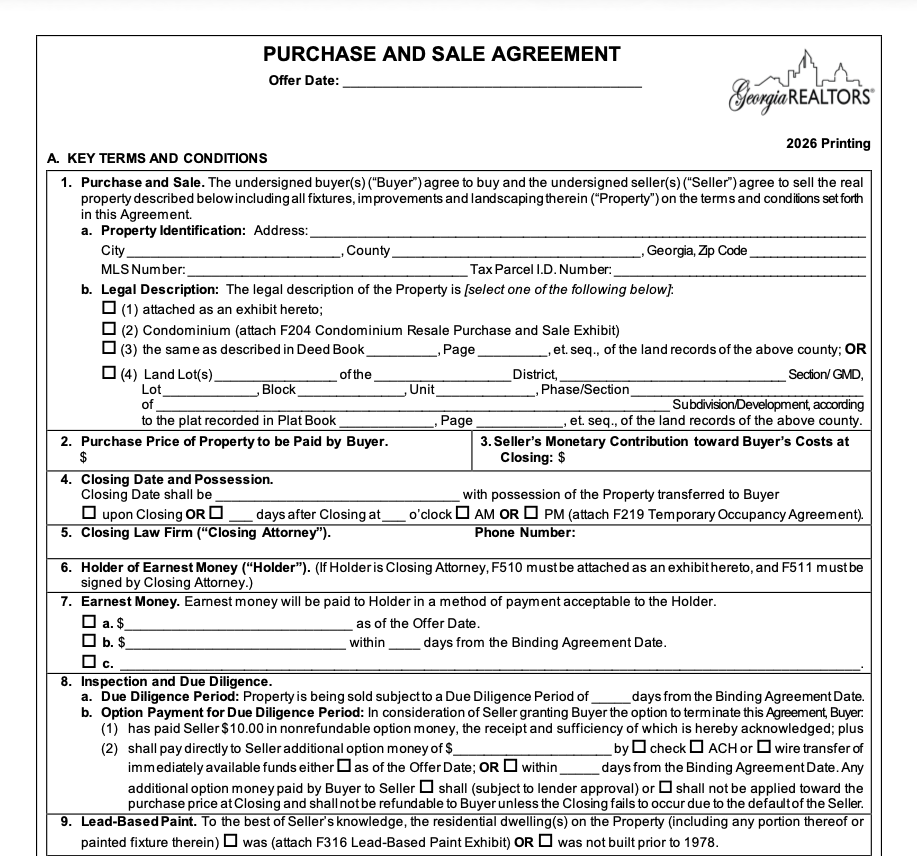
| "Write an offer on 50 Brookhaven Dr at $700,000, closing in 30 days" | Yes. Fills the state's contract and exhibits and seats the signers | Not found on the pages we read. The agent fills in the form (Dotloop's help center) |
| "Counter at $715,000" or "Move closing to August 19" | Yes. Writes the state's counteroffer or amendment form | Not found on the pages we read |
| "Start a listing at 12 Oak St" | Yes. Creates the listing, prepares its agreement and disclosures, and invites the sellers | Not found on the pages we read |
| "Here is their signed counter" (a PDF) | Yes. Works out what it is, reads its terms and stages the change for you to approve | In part. Not in Dotloop itself. A partner, Indigo, reads documents for a brokerage's compliance team (Dotloop's help center) |
| "Send this for signature" | Yes. Places the fields, names who signs and waits for your approval to send | Not found on the pages we read. The agent assigns each signature and shares the document (Dotloop's help center) |
| "What does this deal still need?" | Yes. Lists the documents and signatures still missing | Not found on the pages we read |
| Ask from your own AI agent | Yes. Claude, ChatGPT, Muse, Grok, Instinct and any other AI agent that takes connectors | Not found on the pages we read |
Writing an offer in each
In TurboOffice: one request
The agent says the price, the earnest money and the dates, in TurboOffice or in their own AI agent. The assistant picks the state's contract and exhibits, fills them in and seats the signers, with the signing fields already on each form. The agent reads the draft and approves the send.
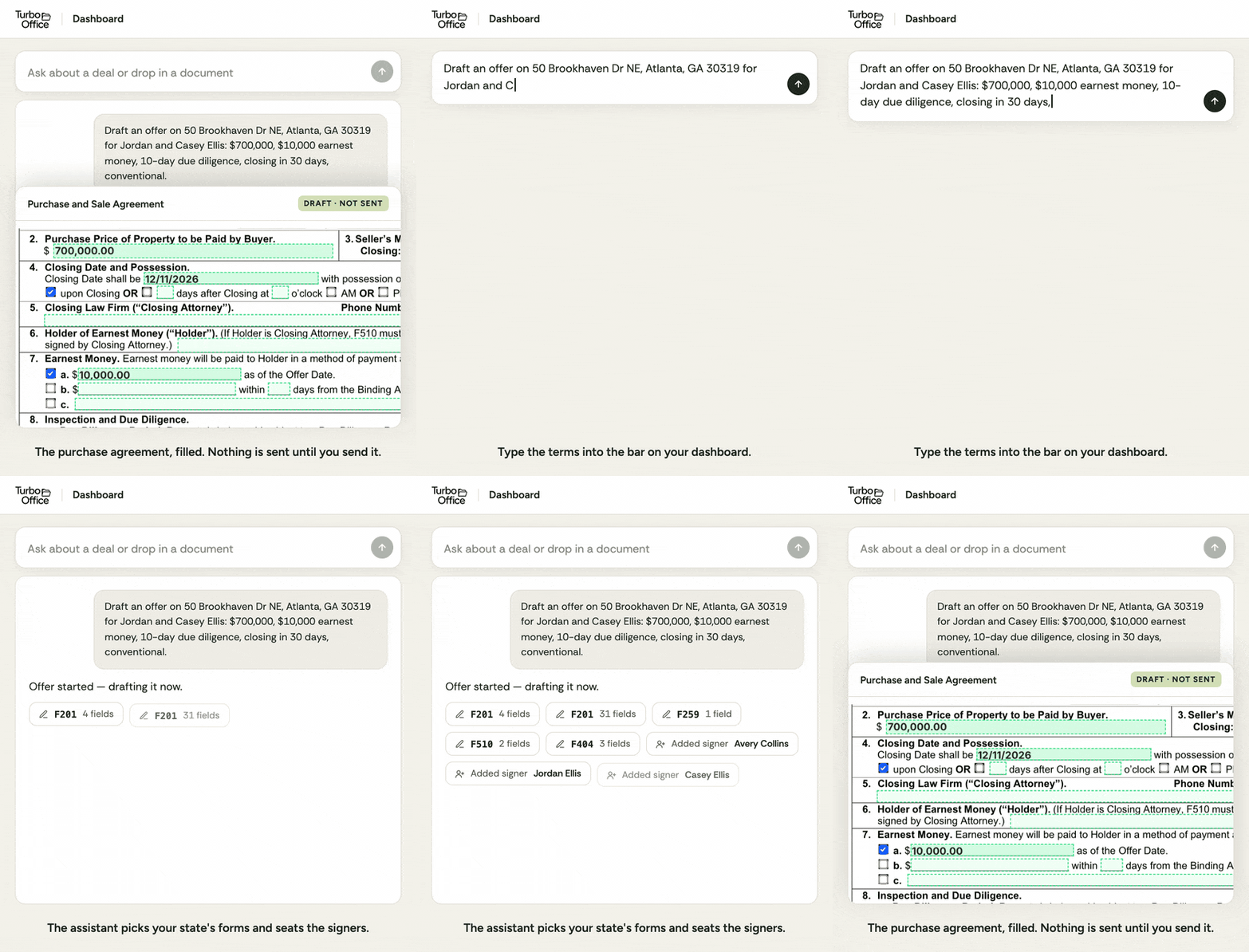
An animation of one request on TurboOffice's dashboard.
In Dotloop: five steps
From Dotloop's help center, after the agent links their loop to the listing (Dotloop's help center):
- Open the contract or offer document in the loop.
- Complete the document and assign the fields. Autofill enters what the loop has, the agent types the rest, and each signature and initial is assigned to a person or role. A flat PDF has to be set up as an interactive document first.
- Share the document with the clients, with permission to sign.
- When the buyers have signed, check that the seller's and the listing agent's signatures are assigned.
- Share the document with the listing agent.
What it looks like
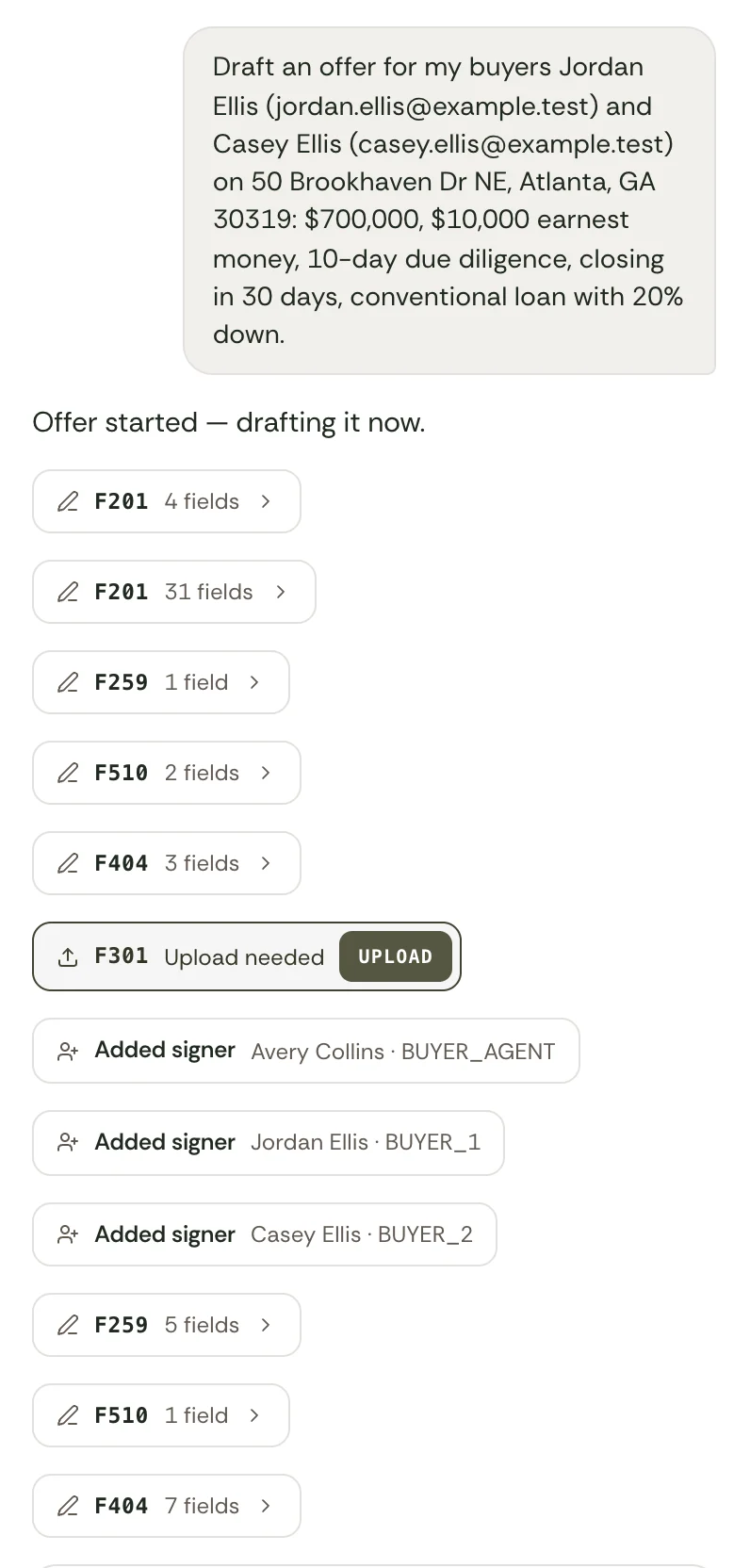
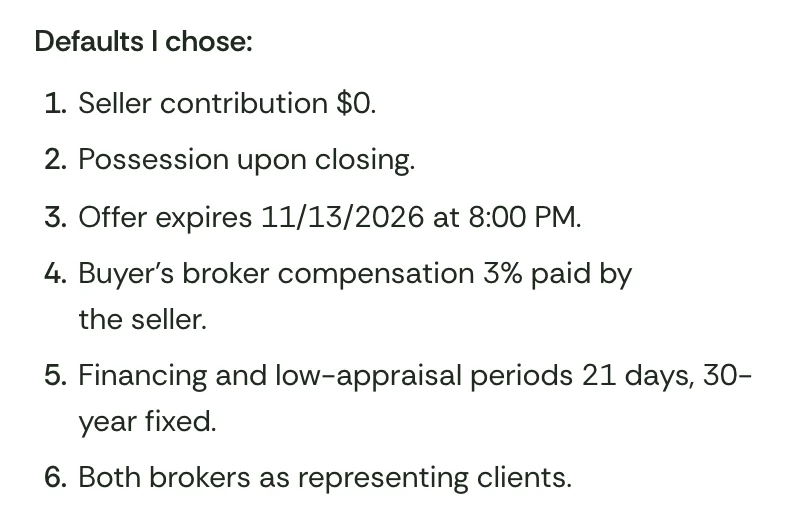
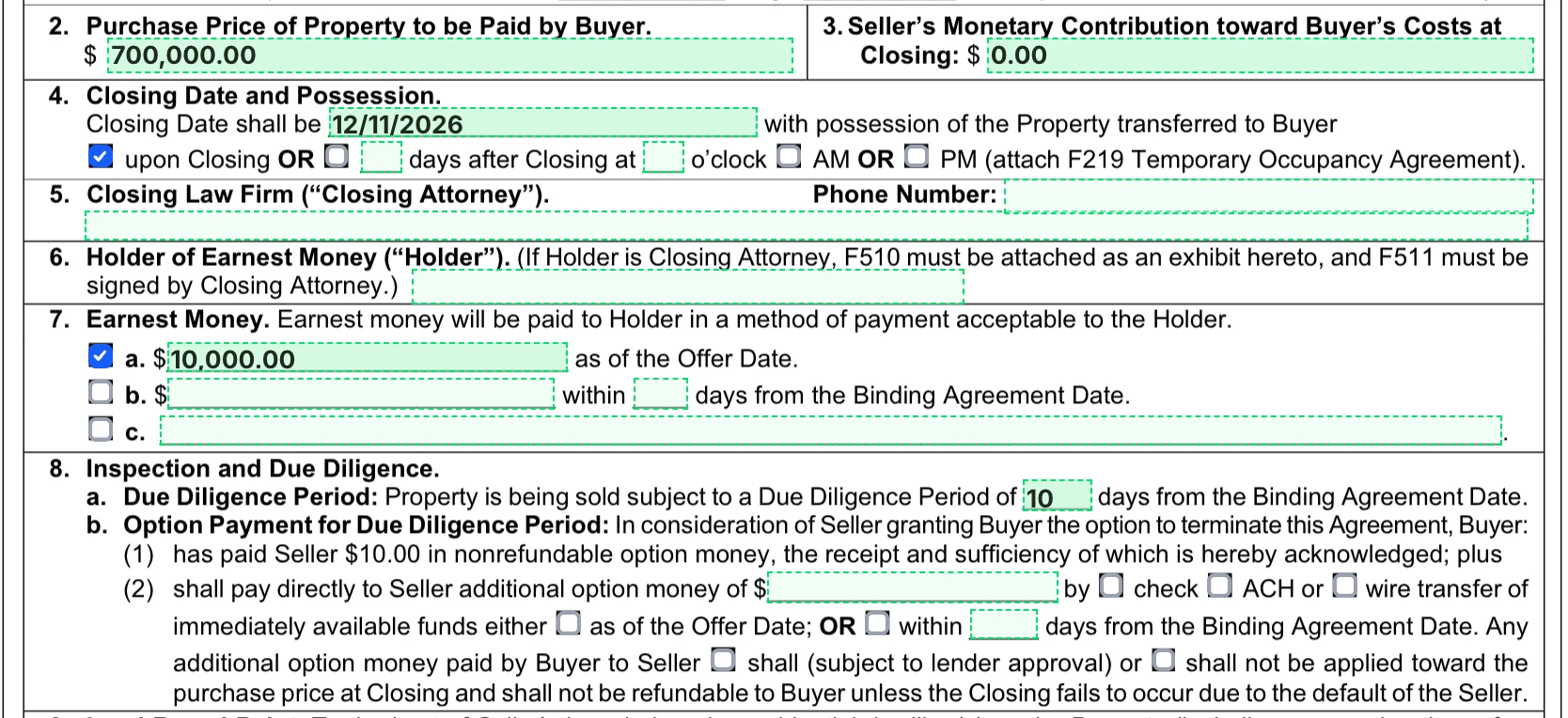
We think TurboOffice is the more modern product and the better experience: you ask, it does the work, and you read the result. The pictures above are the real product with a sample deal and invented buyers. A new account has a 14-day free trial, so you can check.
We think Dotloop looks and works like older software: loops, folders and forms that the agent fills in field by field. That is our view, so look for yourself. Dotloop shows its own product in its starter guide videos, and we do not copy its pictures here.
Your brokerage's brand
A brokerage on TurboOffice's Brokerage plan runs it as its own software. Its agents and clients sign in at the brokerage's own domain and see its logo and colors, and emails about a deal come from the brokerage's address. The Pro plan, for agents and small teams, carries TurboOffice's name.

TurboOffice's sign-in page under three brokerage brands. See white-label.
Dotloop offers custom branding on its Teams and Business+ plans: the brokerage's logo and color scheme at the top of each page and in the emails it shares (Dotloop's help center). It is not on the Free or Premium plans (Dotloop's help center). Running Dotloop at the brokerage's own domain is not on the pages we read.
Side by side
| TurboOffice | Dotloop | |
|---|---|---|
| What it is | Transaction software built for AI agents | Transaction management software for agents, teams and brokers, owned by Zillow (Dotloop, Zillow) |
| Where it works | Georgia, North Carolina and Florida today. A new state takes under 10 days with a partner brokerage there | Forms from more than 190 associations and MLSs (Dotloop) |
| Price for an agent | $39 per agent per month, or $32 billed yearly | Premium is $34.99 a month, or $344 a year (Dotloop) |
| Free plan | A 14-day free trial | Free for up to 10 transactions (Dotloop) |
| Price for a team or brokerage | Larger brokerages are priced per transaction, quoted | Teams and Business+ are quoted (Dotloop) |
| Writing an offer | The assistant writes it on the state's contract and addenda from a plain-English request. The agent approves the send | The agent opens the form, autofills it from the loop's details, types the rest and assigns the signatures. Writing an offer from a description is not on the pages we read (Dotloop's help center) |
| Paper that arrives | Reads an uploaded PDF, works out what it is and whether it is signed, reads its terms and files it | Added from the computer or by forwarding an email. A partner, Indigo, reads documents for a brokerage's compliance team (Dotloop's help center, Dotloop's help center) |
| Your own AI agent | Connects to Claude, ChatGPT, Muse, Grok, Instinct and any other AI agent that takes connectors. It works the deal: offers, counters, signing and the file | None on the pages we read. A public API by request (Dotloop's API documentation) |
| E-signature | Included, with no per-envelope fee | Included, with in-person signing and contracts shared by text (Dotloop) |
| Compliance review | Each deal lists what it still needs. An AI review of each file, reported to the brokerage's reviewer, is a paid add-on | Agents submit documents for review, and the brokerage's transaction coordinators review them, with automated workflows and templates on the team and broker plans (Dotloop) |
| Your own brand | The whole product at the brokerage's domain, on the Brokerage plan | A logo and color scheme on the Teams and Business+ plans (Dotloop's help center) |
| Reporting | Not a reporting product | Dashboards and exports for brokers (Dotloop) |
| Commissions and accounting | Not included | Not included. It connects to accounting software (Dotloop) |
| Phone | Runs in the phone's browser, and from an AI agent's own phone app where that app takes connectors. A mobile app is planned for 2027 | iOS and Android apps (Dotloop) |
| Integrations | Lofty, Google Calendar and AI agents | More than 75 (Dotloop) |
| Size | A young company. TurboOffice ran one Atlanta brokerage for two years before it was offered to others | More than 7,500 brokerages and teams (Dotloop) |
Documents: what the software does itself
This is where the two differ most. Each line below is something TurboOffice does without a person filling in a form. What waits for the agent is said on the line.
- Writing an offer. The agent asks in plain English. The assistant picks the state's contract and exhibits, fills in the terms and the property and agent details, and seats the agent and the buyers as signers. The signature, initial and date fields are already on each form. The agent approves the send.
- Counters, amendments and terminations. A request such as "move closing to August 19" produces the state's counteroffer form if nothing is bound yet, its amendment form if the contract is bound, or its termination form. The agent approves the send.
- Paper that arrives from the other side. The agent uploads the PDF. TurboOffice works out what the document is and whether it is signed, reads the terms of an offer, counter or amendment, and files it. Scanned pages are read too. Anything that would change the deal, such as recording a counter or binding a contract, waits as a card for the agent to approve.
- Signing fields on any PDF. A form TurboOffice knows arrives with its fields placed. On any other PDF, the assistant places the signature, initial and date fields when the agent asks.
- Seller's disclosures. A short questionnaire about the property picks the state's disclosure forms, such as the lead-paint and HOA exhibits in Georgia. The sellers are emailed an invitation to fill them in. The agent reviews and sends them for signature.
- What a deal still needs. Each deal lists the documents it still needs and marks one met when the signed paper completes or a verified upload arrives.
- When everyone has signed. The PDF is sealed with a digital certificate and stamped with the binding date, everyone on it is emailed the signed copy, the contract is recorded as bound and the deal moves to under contract. Nobody has to do anything.
Dotloop's pages describe forms that autofill from a loop's details, a document editor, templates and a review process run by the brokerage's staff. They do not say that Dotloop writes the paper.
Where Dotloop is stronger
- Forms coverage. More than 190 associations and MLSs. TurboOffice has three states today and adds a state in under 10 days when a brokerage there partners with it.
- Price for one agent. Premium is $34.99 a month, a little less than TurboOffice, and there is a free plan for up to 10 transactions.
- Easier to predict. The agent fills in the form and the coordinator reviews it. TurboOffice's paper is written by AI, which is why the agent reads and approves it before anything is sent.
- Compliance for a brokerage's staff. Submit-for-review, custom review stages, transaction templates and an activity log are built for transaction coordinators, and they work from a phone.
- Mobile apps, texting and in-person signing. Dotloop has all three. TurboOffice runs in the browser today, and its mobile app is planned for 2027.
- Integrations and reporting. More than 75 integrations and broker dashboards.
- Size. Dotloop says more than 7,500 brokerages and teams use it.
Where TurboOffice is stronger
- An assistant does the document work. It writes offers, counters and amendments on the state's forms, reads the paper that comes back and keeps track of what each deal still needs. The agent approves anything that sends paper or binds a contract.
- It works in the AI agent you already use. Connect Claude, ChatGPT, Muse, Grok, Instinct and any other AI agent that takes connectors, then ask about a deal, start a counter or set a document up for signing. See how TurboOffice works with AI agents. We found no connector for an AI agent on Dotloop's pages.
- It reads what comes in. Upload the other side's counter or a signed copy and TurboOffice works out what it is, reads its terms and stages the change to the deal for the agent to approve.
- A brokerage's own domain. On the Brokerage plan, agents and clients sign in at the brokerage's domain and deal emails come from its address.
- It is open. The prices, the docs, the list of the assistant's tools and the plugin's source code are public.
What each costs
TurboOffice's Pro plan is $39 per agent per month billed monthly, or $32 per agent per month billed yearly, with a 14-day free trial for a new account. The Brokerage plan, for larger brokerages, is priced per transaction and quoted for each brokerage. See pricing.
Dotloop Premium, for one agent, is $34.99 a month or $344 a year. A free account covers up to 10 transactions. Dotloop for Teams and Business+ are quoted. For one agent, Dotloop costs a little less.
Questions
Does Dotloop have AI? We found no AI feature of Dotloop's own on its product pages. Its help center lists an integration with Indigo, a separate company whose AI reads documents for a brokerage's compliance team.
Can I use Claude or ChatGPT with Dotloop? We found no connector for an AI agent on Dotloop's pages. TurboOffice connects to Claude, ChatGPT, Muse, Grok, Instinct and any other AI agent that takes connectors: an agent adds it and can ask about a deal, start an offer or a counter and set a document up for signing.
Is TurboOffice cheaper than Dotloop? No, not for one agent. Dotloop Premium is $34.99 a month and has a free plan for up to 10 transactions. TurboOffice's Pro plan is $39 per agent per month, or $32 billed yearly.
Can a brokerage put its own brand on TurboOffice? Yes, on the Brokerage plan. Agents and clients sign in at the brokerage's own domain and see its logo and colors, and emails about a deal come from the brokerage's address.
Sources
Read on the date at the top of this page. Dotloop's own pages are the authority on Dotloop: where this page and Dotloop's site disagree, Dotloop's site is right.
- Dotloop's plans and pricing
- Dotloop for brokers
- Dotloop Premium
- Dotloop's help center on making an offer, adding documents to a loop, the Indigo integration, branding and its free and Premium accounts
- Dotloop's API documentation
- Zillow Group's investor page, for the ownership
Dotloop is a trademark of its owner. TurboOffice is not affiliated with Dotloop or Zillow.