### In TurboOffice: one request
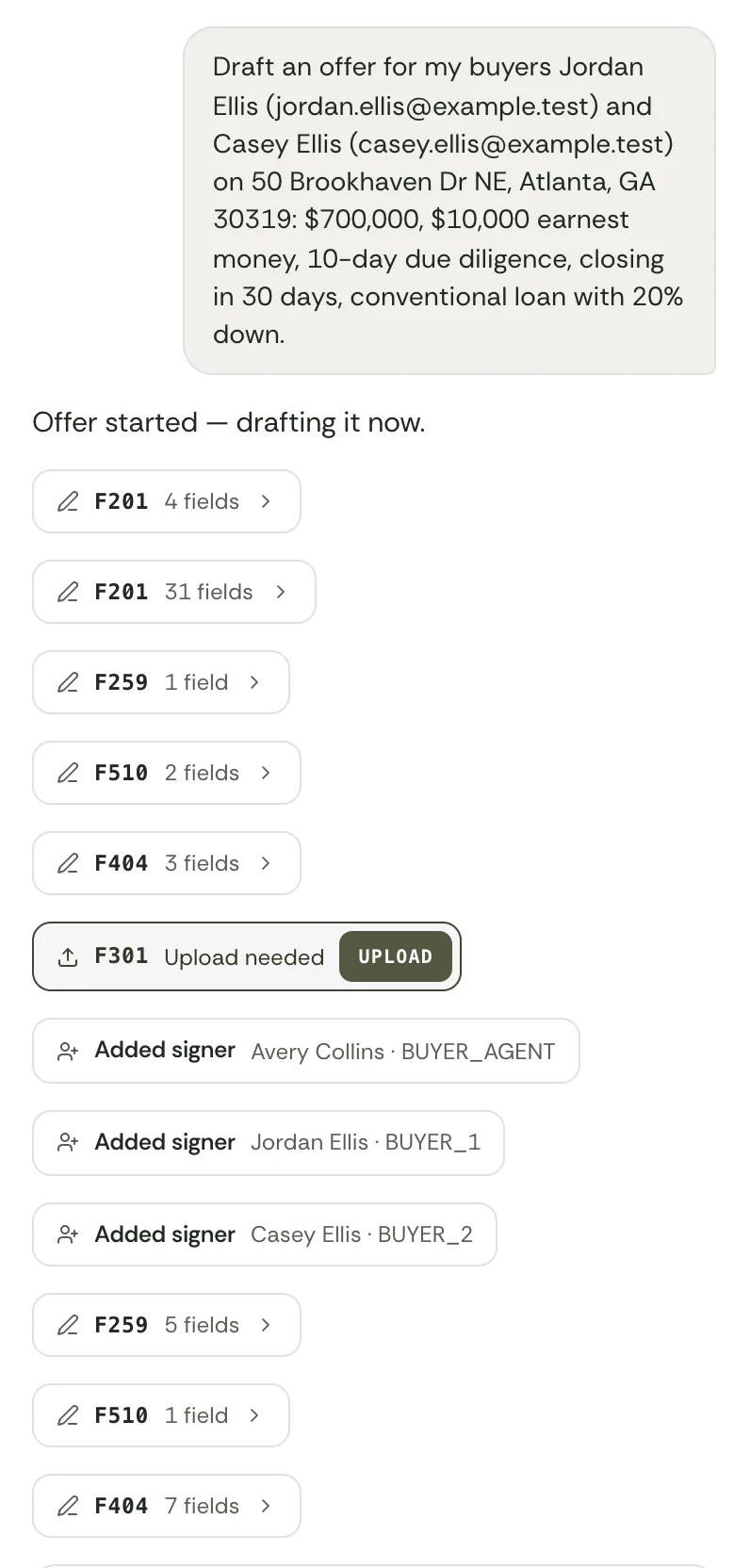
The agent says the price, the earnest money and the dates, in TurboOffice or in their own AI agent. The assistant picks the state's contract and exhibits, fills them in and seats the signers, with the signing fields already on each form. The agent reads the draft and approves the send.
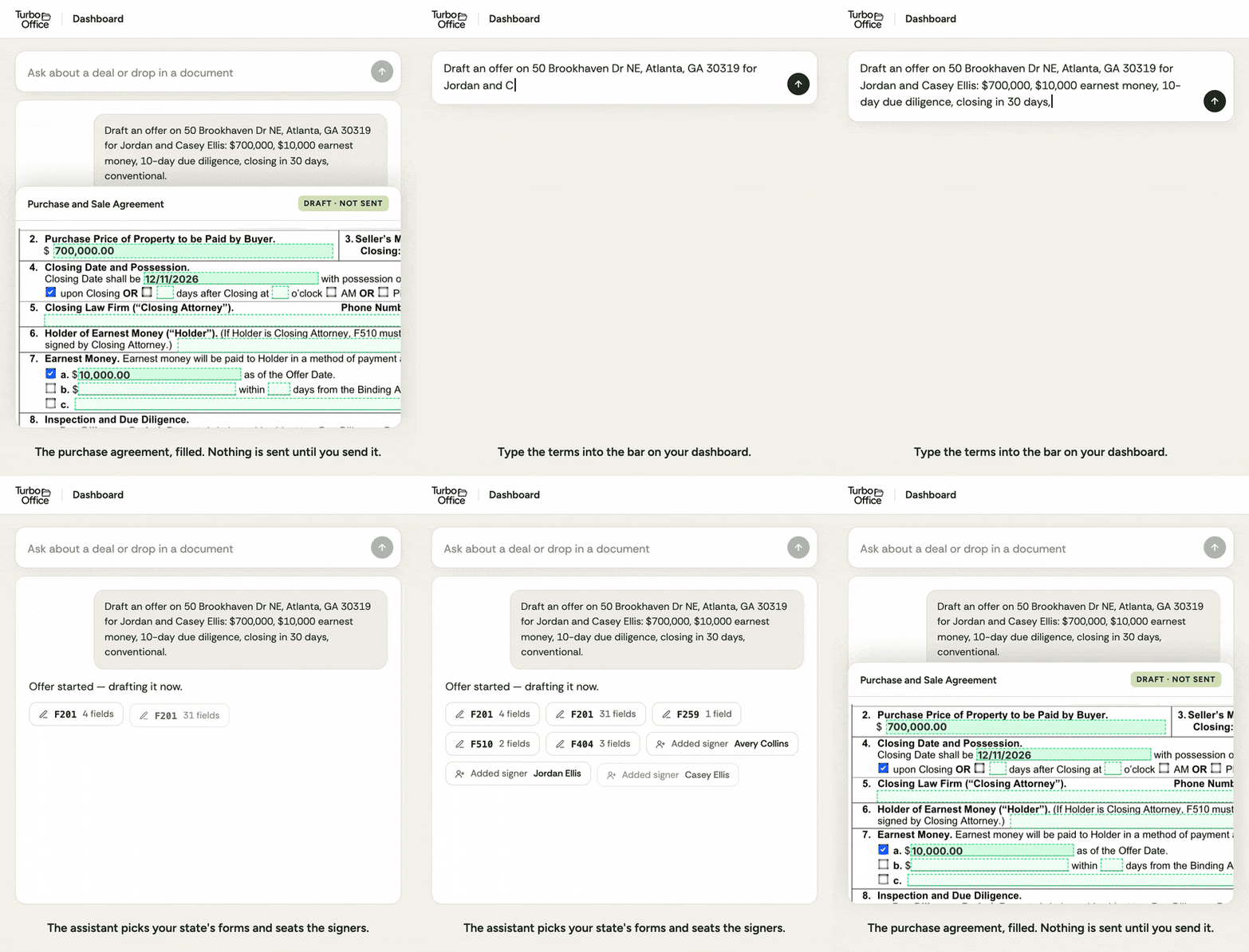 *An animation of one request on TurboOffice's dashboard.*
### In SkySlope: six steps
From SkySlope's help center ([creating a file](https://support.skyslope.com/hc/en-us/articles/360046687811), [sending an envelope](https://support.skyslope.com/hc/en-us/articles/360046243152)):
1. Create a file: enter the client's details and the property's, or import the property from the MLS.
2. Add the forms from the library, upload a PDF or apply a template.
3. Fill in the forms. Names and property details fill from the file, and the agent fills in the rest.
4. Prepare the signatures in DigiSign: name the envelope and set what each signer does.
5. Check the signing fields: placed automatically on a library form, by hand on an uploaded document.
6. Send for signatures.
SkySlope says an agent in California or North Carolina can start the offer by voice in its iOS app, in a beta.
 *TurboOffice's sign-in page under three brokerage brands. See [white-label](https://turbooffice.ai/features/white-label).*
SkySlope lets a broker upload the company's logo ([SkySlope's help center](https://support.skyslope.com/hc/en-us/articles/115001190172-Upload-Your-Company-Logo)), and it describes its custom branding as covering the roster and the login screen ([SkySlope](https://skyslope.com/pricing/skyslope-vs-lonewolf/)). Running SkySlope at the brokerage's own domain, and which address its emails come from, are not on the pages we read.
## Side by side
| | TurboOffice | SkySlope |
| --- | --- | --- |
| What it is | Transaction software built for AI agents | Transaction management for brokerages, with forms, e-signature, offers and accounting products ([SkySlope](https://skyslope.com/)) |
| Who uses it | Agents, teams and brokerages | Brokers, agents, auditors and transaction coordinators ([SkySlope](https://skyslope.com/products-services/skyslope/)) |
| Where it works | Georgia, North Carolina and Florida today. A new state takes under 10 days with a partner brokerage there | The US and Canada ([SkySlope](https://skyslope.com/)) |
| Price | $39 per agent per month, or $32 billed yearly. Larger brokerages are priced per transaction, quoted | SkySlope Suite starts at $340 a month with no long-term contract. E-signature and accounting are add-ons ([SkySlope](https://skyslope.com/pricing/)) |
| How you start | A 14-day free trial, or a demo | A demo ([SkySlope](https://skyslope.com/pricing/)) |
| Writing an offer | The assistant writes it on the state's contract and addenda from a plain-English request, in TurboOffice or in their own AI agent. The agent approves the send | Agents fill in forms that are pre-loaded and filled with MLS data. Voice Offers, a beta in its iOS app, starts an offer by voice in California and North Carolina ([SkySlope](https://skyslope.com/products-services/forms/), [SkySlope](https://skyslope.com/smart-suite/)) |
| Paper that arrives | Reads an uploaded PDF, works out what it is and whether it is signed, reads its terms and files it | Uploaded documents go to the office inbox for an auditor. Auto-Split & Assign puts a PDF's parts on the checklist, and Smart Scan reads a purchase contract for Stellar MLS and realMLS members ([SkySlope](https://skyslope.com/products-services/skyslope/), [SkySlope](https://skyslope.com/smart-suite/)) |
| Signing fields | Already placed on known forms. Placed by the assistant on any other PDF when asked | Placed automatically on library forms, and Smart Blocks detects where signatures go ([SkySlope's help center](https://support.skyslope.com/hc/en-us/articles/360046243152), [SkySlope](https://skyslope.com/smart-suite/)) |
| Your own AI agent | Connects to Claude, ChatGPT, Muse, Grok, Instinct and any other AI agent that takes connectors. It works the deal: offers, counters, signing and the file | None on the pages we read |
| E-signature | Included, with no per-envelope fee | DigiSign, with unlimited envelopes. $6.25 a month billed yearly, bulk plans for brokerages ([SkySlope](https://skyslope.com/products-services/digisign/)) |
| Offers on a listing | Shown side by side with an estimated net to the seller | SkySlope Offers collects and compares offers ([SkySlope](https://skyslope.com/products-services/offers/)) |
| Compliance review | Each deal lists what it still needs. An AI review of each file, reported to the brokerage's reviewer, is a paid add-on | Admins build checklists, agents get a daily reminder for a missing item, and the brokerage's auditors review files with Smart Assist ([SkySlope](https://skyslope.com/products-services/skyslope/), [SkySlope](https://skyslope.com/smart-suite/)) |
| Your own brand | The whole product at the brokerage's domain, on the Brokerage plan | A company logo, with custom branding on the roster and the login screen ([SkySlope's help center](https://support.skyslope.com/hc/en-us/articles/115001190172-Upload-Your-Company-Logo), [SkySlope](https://skyslope.com/pricing/skyslope-vs-lonewolf/)) |
| Commissions and accounting | Not included | SkySlope Books, an add-on ([SkySlope](https://skyslope.com/pricing/)) |
| Phone | Runs in the phone's browser, and from an AI agent's own phone app where that app takes connectors. A mobile app is planned for 2027 | iOS and Android apps, rated 4.8 of 5 on the App Store and 3.1 of 5 on Google Play ([SkySlope](https://skyslope.com/products-services/forms/), [App Store](https://apps.apple.com/us/app/skyslope/id1608944544), [Google Play](https://play.google.com/store/apps/details?id=com.skyslope.forms_mobile)) |
| Size | A young company. TurboOffice ran one Atlanta brokerage for two years before it was offered to others | More than 900,000 professionals and 3 million transactions a year ([SkySlope](https://skyslope.com/)) |
## Documents: what the software does itself
Each line below is something TurboOffice does without a person filling in a form. What waits for the agent is said on the line.
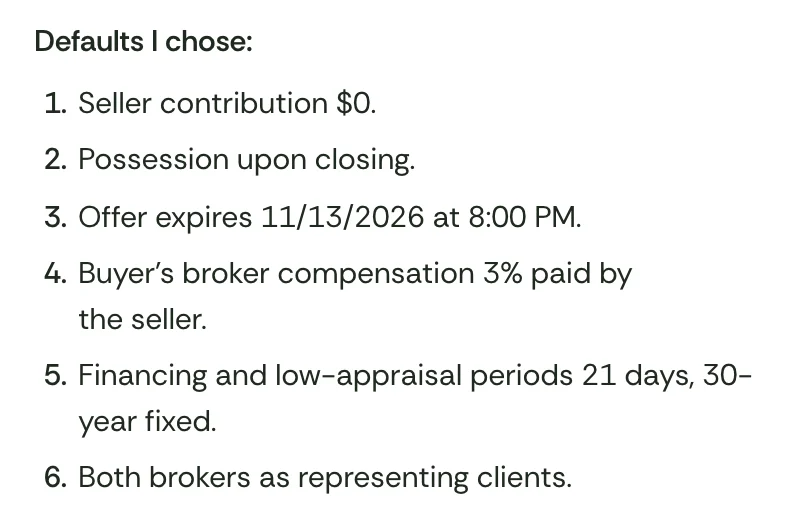
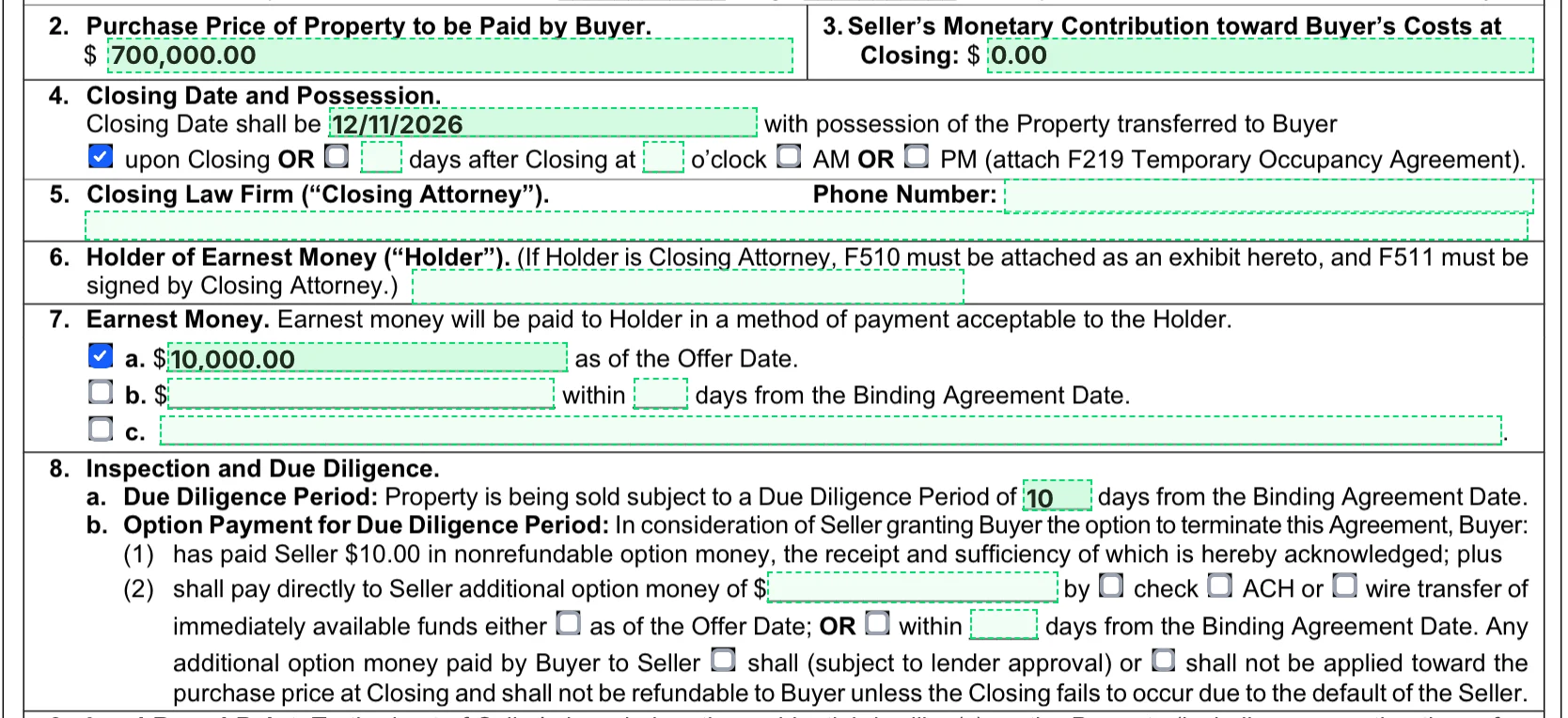
- **Writing an offer.** The agent asks in plain English. The assistant picks the state's contract and exhibits, fills in the terms and the property and agent details, and seats the agent and the buyers as signers. The signature, initial and date fields are already on each form. The agent approves the send.
- **Counters, amendments and terminations.** A request such as "move closing to August 19" produces the state's counteroffer form if nothing is bound yet, its amendment form if the contract is bound, or its termination form. The agent approves the send.
- **Paper that arrives from the other side.** The agent uploads the PDF. TurboOffice works out what the document is and whether it is signed, reads the terms of an offer, counter or amendment, and files it. Scanned pages are read too. Anything that would change the deal, such as recording a counter or binding a contract, waits as a card for the agent to approve.
- **Signing fields on any PDF.** A form TurboOffice knows arrives with its fields placed. On any other PDF, the assistant places the signature, initial and date fields when the agent asks.
- **Seller's disclosures.** A short questionnaire about the property picks the state's disclosure forms, such as the lead-paint and HOA exhibits in Georgia. The sellers are emailed an invitation to fill them in. The agent reviews and sends them for signature.
- **What a deal still needs.** Each deal lists the documents it still needs and marks one met when the signed paper completes or a verified upload arrives.
- **When everyone has signed.** The PDF is sealed with a digital certificate and stamped with the binding date, everyone on it is emailed the signed copy, the contract is recorded as bound and the deal moves to under contract. Nobody has to do anything.
## Where SkySlope is stronger
- **Size.** SkySlope works across the US and Canada and reports more than 3 million transactions a year. TurboOffice has three states today and adds a state in under 10 days when a brokerage there partners with it.
- **Easier to predict.** Forms an agent fills in and a checklist an auditor works through are simple to understand. TurboOffice's paper is written by AI, which is why the agent reads and approves it before anything is sent.
- **A compliance workflow for staff.** Checklists, daily reminders for missing documents, an office inbox, an audit queue and an AI helper for the auditor are built for a brokerage with people who review files.
- **Offers by voice.** SkySlope says an agent in California or North Carolina can start an offer by speaking to its iOS app, in a beta. TurboOffice takes a typed request, in TurboOffice or in their own AI agent.
- **Accounting.** SkySlope Books handles commission disbursement and back-office accounting. TurboOffice does not pay agents or track commission splits between agents and their brokerage.
- **Mobile apps and support.** SkySlope has iOS and Android apps and advertises 24/7 support. TurboOffice runs in the browser today, and its mobile app is planned for 2027. Read the apps' reviews before you rely on them. The iPhone app averages 4.8 of 5 from about 1,000 ratings, yet four of the six reviews its App Store page showed on November 15, 2026 gave it one star, and two of those describe it failing to complete an action or upload a document ([App Store](https://apps.apple.com/us/app/skyslope/id1608944544)). The Android app averages 3.1 of 5 from 41 ratings ([Google Play](https://play.google.com/store/apps/details?id=com.skyslope.forms_mobile)).
- **More products.** It also sells a disclosures tool and a transaction coordination service.
## Where TurboOffice is stronger
- **One assistant for the whole deal.** It writes offers, counters and amendments on the state's forms, reads the paper that comes back and keeps track of what each deal still needs, in every state TurboOffice covers. The agent approves anything that sends paper or binds a contract.
- **It works in the AI agent you already use.** Connect Claude, ChatGPT, Muse, Grok, Instinct and any other AI agent that takes connectors, then ask about a deal, start a counter or set a document up for signing. See [how TurboOffice works with AI agents](https://turbooffice.ai/ai). We found no connector for an AI agent on SkySlope's pages.
- **A brokerage's own domain.** On the Brokerage plan, agents and clients sign in at the brokerage's domain and deal emails come from its address.
- **The price is public and per agent.** $39 per agent per month, or $32 billed yearly, with e-signature included. SkySlope's published price is a starting price for the Suite, and its page does not say how many people that covers.
- **Anyone can start.** A new account has a 14-day free trial. SkySlope starts with a demo.
- **It is open.** The prices, the [docs](https://turbooffice.ai/docs), the list of the assistant's tools and the plugin's source code are public.
## What each costs
TurboOffice's Pro plan is $39 per agent per month billed monthly, or $32 per agent per month billed yearly, with a 14-day free trial for a new account. The Brokerage plan, for larger brokerages, is priced per transaction and quoted for each brokerage. See [pricing](https://turbooffice.ai/pricing).
SkySlope's pricing page lists the SkySlope Suite starting at $340 a month with no long-term contract, with forms included and e-signature and accounting as add-ons. On its own, DigiSign is $6.25 a month billed yearly. For an agent or a small team TurboOffice costs less. For a large office we have not compared quotes, and SkySlope may cost less per agent.
## Questions
**Does SkySlope use AI?** Yes. SkySlope's Smart Suite includes AI that starts an offer by voice in its iOS app (a beta, in California and North Carolina), reads purchase contracts for members of two MLSs, places signing fields, splits uploaded PDFs and helps auditors review files.
**Can I use Claude or ChatGPT with SkySlope?** We found no connector for an AI agent on SkySlope's pages. TurboOffice connects to Claude, ChatGPT, Muse, Grok, Instinct and any other AI agent that takes connectors: an agent adds it and can ask about a deal, start an offer or a counter and set a document up for signing.
**Is TurboOffice cheaper than SkySlope?** For an agent or a small team, yes. TurboOffice's Pro plan is $39 per agent per month with e-signature included. SkySlope Suite starts at $340 a month. For a large office we have not compared quotes.
**Can a brokerage put its own brand on TurboOffice?** Yes, on the Brokerage plan. Agents and clients sign in at the brokerage's own domain and see its logo and colors, and emails about a deal come from the brokerage's address.
## Sources
Read on the date at the top of this page. SkySlope's own pages are the authority on SkySlope: where this page and SkySlope's site disagree, SkySlope's site is right.
- [SkySlope's homepage](https://skyslope.com/)
- [SkySlope's pricing page](https://skyslope.com/pricing/)
- [SkySlope Smart Suite](https://skyslope.com/smart-suite/)
- [SkySlope's mobile app](https://skyslope.com/skyslope-mobile/)
- [SkySlope Suite](https://skyslope.com/products-services/skyslope/)
- [SkySlope Forms](https://skyslope.com/products-services/forms/)
- [DigiSign](https://skyslope.com/products-services/digisign/)
- [SkySlope Offers](https://skyslope.com/products-services/offers/)
- [SkySlope on its APIs](https://skyslope.com/general/unlocking-the-power-of-your-data/)
- SkySlope's help center on [creating a Forms file](https://support.skyslope.com/hc/en-us/articles/360046687811), [sending a Forms envelope](https://support.skyslope.com/hc/en-us/articles/360046243152) and [uploading a company logo](https://support.skyslope.com/hc/en-us/articles/115001190172-Upload-Your-Company-Logo)
- [SkySlope on its branding, in its comparison with Lone Wolf](https://skyslope.com/pricing/skyslope-vs-lonewolf/)
- SkySlope's app on the [App Store](https://apps.apple.com/us/app/skyslope/id1608944544) and on [Google Play](https://play.google.com/store/apps/details?id=com.skyslope.forms_mobile), for the ratings and reviews
SkySlope, DigiSign and Breeze are trademarks of their owner. TurboOffice is not affiliated with SkySlope.